Documentation
0.
FAQ
How to Install an App?
How to Reinstall an App?
the App Cost?
How to Pay?
the App Extension
Promised Payment
What to Do in Case of Error?
Where to Find the Account ID?
How to Clear the Cache?
1.
Payer
Installation
App Configuration
Basic Configuration
Client Reminders
Reminder for the Manager
Export Fields Configuration
Custom Statuses
Change History
Required Payment at Stage
Budget Sync
Budget Check
Restrict Payment Modification
Payment Management
Add Income
Add Expense
Edit Payment
Delete Payment
Deleting Multiple Payments
Mark as Paid
View Comment
Add Installment
Export Lead Payments
Analytics
Payment Calendar
Payment Filtering
Payment Information
Consolidated Report
Monthly Export
Export by Period
Downloading a Payment Schedule
2.
Dokker
Installation
App Configuration
Google Auth
Add Template
Download Template
Delete Template
Editing the Template
Settings
Placeholders
Modifiers
Picture Insertion
App Usage
Template Configuration
Document Generation
Document Actions
Download Document
Download as PDF
Update Document
Edit Document
Share Document
Delete Document
Payer
Creditor
3.
Creditor
Installation
App Configuration
Basic Configuration
Client Reminders
Reminder for the Manager
Export Fields Configuration
Custom Statuses
Payment Change History
Required Payment at Stage
Automatic Installment Creation
Permissions
Field Synchronization
Payment Rounding
Payment Processing
Add Installment
Flexible Installment
Delete Installment
Edit Payment
Add Repayment
Edit Repayment
Delete Repayment
View Comment
Export Installment
Analytics
Payment Calendar
Payment Information
Consolidated Report
Monthly Export
Export by Period
Filtering Stats
Import Payments
Downloading a Payment Schedule
4.
Folder
Installation
Configuration
Uploading Files
From Chats, Emails, and Notes
By Drag-and-Drop
Via File Explorer
File Actions
Download File
Download as PDF
Delete File
Share File
Edit Document
5.
Looker
Installation
Working with the App
In Chats
In Email
In Notes
In Custom Fields
In Media Lists
In the Lead Tab
6.
Linker
Installation
App Configuration
Adding Links
Sorting the List
Working with the App
Following a Link
Link Description
7.
Coler
Installation
App Configuration
Lead Coloring
Tag Coloring
Task Coloring
8.
Tasker
Installation
App Configuration
Working with the app
9.
Noter
Installation
App Configuration
Working with the app
10.
Fielder
Installation
App Configuration
Working with the app
11.
Tager
Installation
App Configuration
Working with the app
12.
Planner
Installation
App Configuration
Working with the App
13.
Mapper
Installation
Working with the App
Map in card
All addresses
More
Site
Contact Us
YouTube
Documentation
>
FAQ
> Where to Find the Account ID
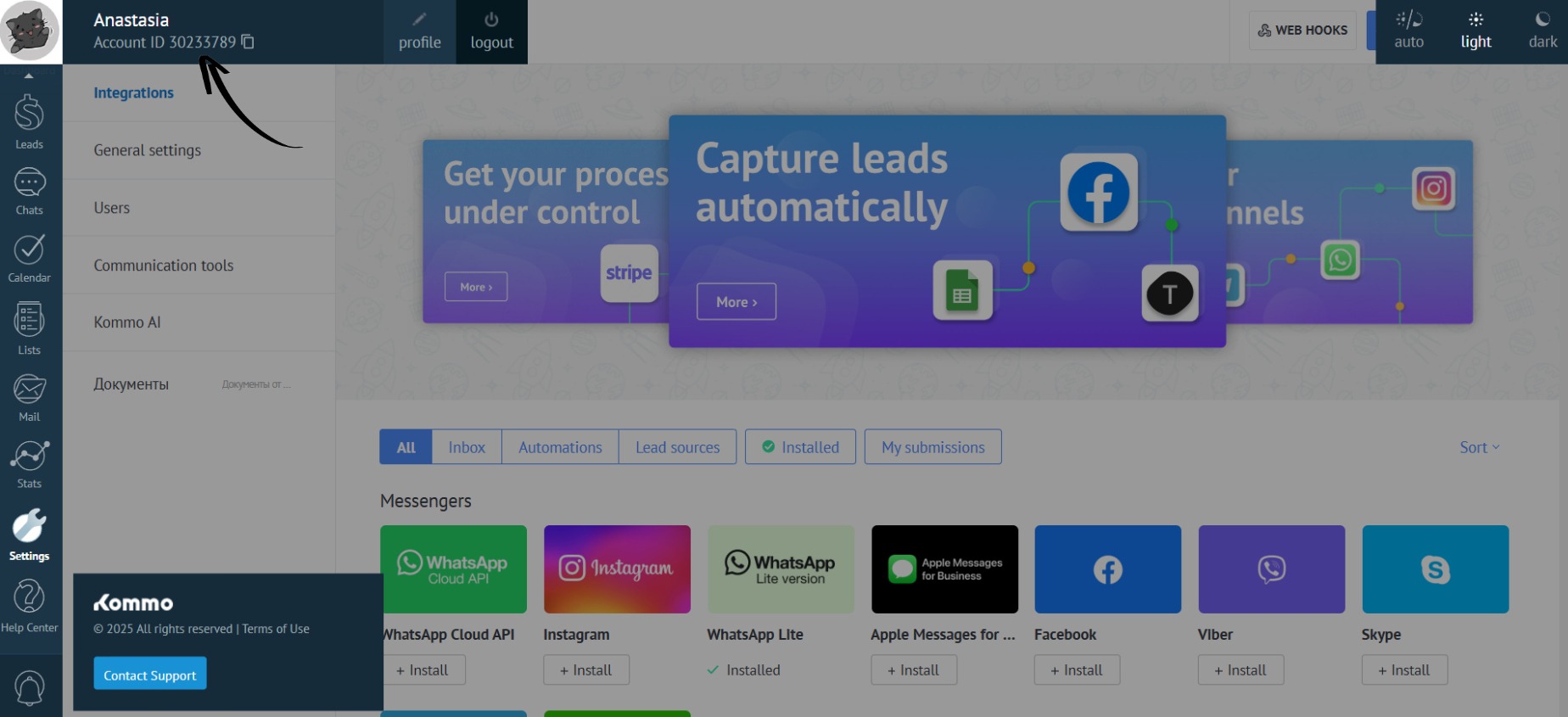
Where to Find the Account ID
Click on the avatar in the top left corner of the screen. The account ID is located in the “Account ID” field: